College GPA Calculator
Quickly and accurately calculate your college GPA with our simple, reliable, and easy-to-use tool. Whether you’re planning your next semester, tracking your academic performance, or setting GPA goals for scholarships and graduation, this calculator helps you stay on top of your studies with confidence.
How to Use the College GPA Calculator
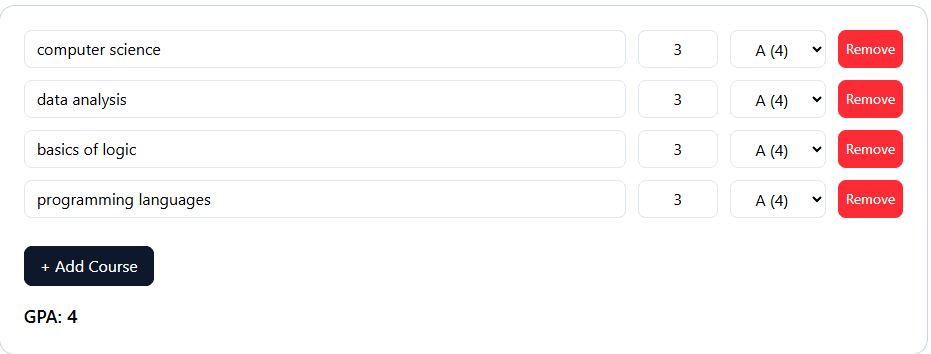
Enter Course Name
Begin by typing the exact name of the course you are currently taking or have completed in college or university. This could be anything from “Introduction to Psychology” to “Advanced Calculus II.” If you’re calculating your GPA for multiple courses in a semester, simply click the Add Course button after each entry. This ensures that all of your courses—whether they’re major-specific classes, general education requirements, electives, or lab sessions—are included in your college GPA calculator results. The more accurately you list your courses, the more precise your GPA calculation will be, whether you’re using a semester GPA calculator, cumulative GPA calculator, or university GPA calculator. For example, if you have a mix of lecture-based and lab-based courses, entering them separately helps the calculator reflect the true impact each has on your academic performance.
Enter Credit or Unit Hours
For each course you enter, include the number of credit hours (also called “units”) that the course carries. Credit hours represent the weight or importance of that course in your overall GPA score. For example, a 4-credit course in Organic Chemistry will have a much greater effect on your GPA than a 1-credit Physical Education class. If your college uses quarter hours instead of semester hours, you can still input those values; the GPA score calculator will adjust the results accordingly. Always double-check your syllabus or course registration details to make sure you’re entering the correct credit hours, as even small mistakes can alter your weighted or unweighted GPA outcome.
Enter Your Grade
Next, input the grade you have earned—or expect to earn—for each course. You can enter letter grades like A, B+, C-, or numeric grades such as 4.0, 3.7, 2.0, depending on your institution’s grading system. The college GPA calculator will automatically translate these into grade point values based on the standard U.S. grading scale. For example, an A typically equals 4.0 points, while a B might equal 3.0. If you’re unsure about how your school converts grades to points, you can usually find this information on your school’s academic website or student handbook. Whether you’re using a university GPA calculator, semester GPA calculator, or academic GPA calculator, entering accurate grades ensures you’ll receive a precise calculation for better academic planning.
View Your Result
Once you’ve entered all your courses, credit hours, and grades, the college GPA calculator will instantly generate your GPA score. Your result will appear directly below the Add Course button, allowing you to review your academic standing in real time. You can use this result to track your progress toward graduation, maintain eligibility for scholarships, or qualify for honors such as Dean’s List. Additionally, you can calculate “what-if” scenarios—such as what GPA you need next semester to reach your target cumulative GPA—making this GPA calculation tool essential for academic goal setting.
College GPA Calculator – Your Complete Guide
The College GPA Calculator is more than just a quick math utility—it’s a reliable and detailed tool designed to help students manage, track, and improve their academic performance over time. Whether your goal is to keep your scholarship, qualify for a competitive internship, prepare for graduate school, or simply maintain a personal academic standard, having accurate GPA results is essential. With this calculator, all you need to do is enter the courses you’ve taken, the credit hours assigned to each, and your grades. Within seconds, you can see your semester GPA or your overall cumulative GPA, giving you a clear understanding of where you stand academically. This insight allows you to plan ahead, decide where to focus your efforts, and take proactive steps to improve or maintain your performance.
This GPA calculator can be used for both semester-based tracking and calculating your cumulative GPA across multiple terms. It works with weighted grading systems, such as those used for honors or advanced placement courses, as well as standard unweighted scales. Whether you are calculating grades for challenging advanced classes, elective courses, or general education requirements, the tool ensures you get an accurate and fair result every time. You can also use it to explore “what-if” scenarios—for example, checking how your GPA might change if you earn certain grades in upcoming courses. From your first semester in college to your final term, this calculator is a dependable companion that helps you stay informed, set realistic academic goals, and make smarter decisions about your education.
Why Use a College GPA Calculator?
- Track your academic performance across semesters using a reliable GPA calculator tool.
- Set realistic GPA targets for scholarships, internships, graduate school admissions, or honor societies.
- Identify subjects that require extra focus to improve your cumulative GPA.
- Plan your course load strategically without risking your GPA score.
How the GPA Calculation Works
The college GPA calculator uses a simple formula—credit hours multiplied by grade point value equals quality points. After adding all quality points, divide by the total credit hours to get your GPA score. This method is consistent with how most university GPA calculators and academic institutions determine GPAs, ensuring accuracy whether you’re calculating a semester GPA or a long-term cumulative GPA.
Frequently Asked Questions
1. Is this calculator accurate?
Yes. Our college GPA calculator uses the same formula trusted by U.S. colleges and universities. The results are as accurate as your input data, making it a dependable academic GPA calculator for students.
2. Can it be used for high school GPA?
Absolutely. While designed for college students, this GPA score calculator works for high school GPAs too, as long as your school uses a similar credit and grading system.
3. Does it support weighted GPAs?
Yes. Our weighted GPA calculator lets you input higher grade values for honors, AP, or IB courses, making it ideal for advanced academic programs.
4. Will my data be saved?
Yes. All data is saved locally in your browser, so your college GPA calculator entries remain available when you return.